Hand the site to your client, not the AI
With handoff on, clients working in wp-admin see your agency's name and logo instead of an open Command Center, while you keep full access and keep operating the site.
Deliver the site without handing over the keys
Handoff mode is how an agency delivers a site without handing over the keys to the AI. Clients see your brand, not WPOS's, and you keep working on the site whenever there is something to do.
You decide what clients can see. AI-built widgets, read-only, and code snippets are shown by default; the AI chat is hidden by default, because most agencies keep the agent to themselves and sell the outcomes. Handoff can also limit individual abilities and panels.
Unlock the Command Center on the site with the handoff password when there is work to do, or switch handoff on and off remotely from the Workspace, with no password entry at the site.
Per site, per surface
Your name and logo
Shown to clients while handoff is active, so the delivered site carries your brand.
Chat hidden by default
Clients do not get an open AI chat unless you switch it on.
Widgets and snippets, read-only
Clients can view AI-built widgets and browse snippets; switch either off.
Limit individual abilities
Handoff can limit individual abilities and panels, and changes apply immediately.
A password for your team
The handoff password unlocks the full Command Center on that site. Keep it with the team.
A remote switch
Turn handoff on or off per site from the Workspace at app.wpos.ai.
From build to delivery
-
01
Build with handoff off
Work normally while the site is in progress.
-
02
Set your brand
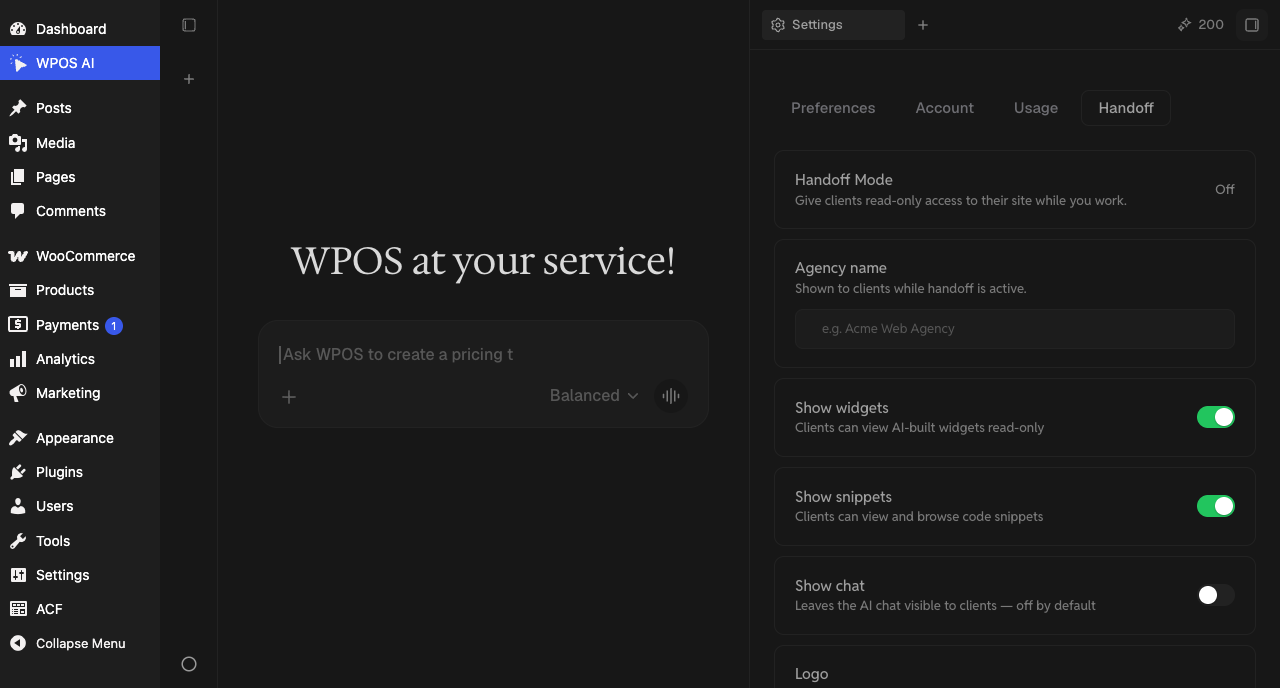
On the Handoff tab in Settings, add your agency name and logo and choose what clients see.
-
03
Switch it on at delivery
Make it part of your delivery checklist, in the same pass as billing for the site.
-
04
Keep operating
Unlock with the password when there is work to do, then lock it again.
The Handoff tab
Configure handoff per site in Settings, on the Handoff tab: the master switch, your agency name and logo, and the switches for widgets, snippets and the chat. Delivered sites should never show an open chat to a curious client.
Handoff is the per-site part of delivering under your brand. To resell WPOS itself under your own name, with managed accounts and an embeddable branded assistant, see the Partner Program and white-label WordPress.
Client handoff, answered.
What clients see, and how you keep working on a delivered site.
A per-site mode that puts WPOS behind your agency's brand when you deliver a site. Clients see your name and logo instead of an open Command Center, and you keep full access to operate the site.
Only if you switch it on. Show chat is off by default; clients can view AI-built widgets read-only and browse snippets unless you hide them.
Unlock the Command Center with the handoff password and lock it again when you are done, or switch handoff off and on remotely from the Workspace.
Handoff is the per-site part: your brand in front of the client. Agencies that want to resell WPOS under their own brand use the Partner Program, which adds managed accounts and an embeddable branded assistant.
Anyone with the Handoff mode permission. It starts on for new members, and the owner can switch it off for any person.
It is hidden. The AI Agents tab, where an outside assistant such as Claude Code is connected, does not show on a site in handoff.
Related features and guides:
- White-label WordPress Deliver WordPress under your agency's brand.
- Partner Program Resell WPOS under your own brand.
- Team and permissions Every client site and the team that runs them.
- Client handoffs without losing knowledge How agencies hand sites over cleanly.
- WPOS for agencies How WPOS runs a client portfolio day to day.
- All WPOS features Every feature, grouped by the job it does.
Start free with 15,000 credits.
Three times the usual 5,000, no card needed. Then 50% off your site licences for 2 months with FRIDAY50.
Deliver under your brand.
Build with WPOS, then hand the site over with the agent locked behind your name. Free for 30 days, 5,000 credits, no card.